Auto-Dormancy for Promo Projects: A Two-Step Workflow Pattern in Vantagepoint
Tue Jul 14 2026
How a nightly scheduled workflow using only SELECT statements solves a recurring AR cleanup problem across AEC firms — no stored procedures required.
Written by: Wesley Witsken
The Problem
In Deltek Vantagepoint, AEC firms track pursuit time using Promotional (Promo) projects — a placeholder project that captures hours charged during business development, before a Regular project exists. Once the Regular project is awarded, the Promo project has done its job. It should stop accepting time.
Vantagepoint has no native mechanism for that transition. Left alone, a Promo project stays active indefinitely after award. That creates two problems:
- Reporting clutter. Dormant pursuits stay visible in active project lists indefinitely.
- Timesheet contamination. Employees can still charge time to the Promo project after the Regular project has been won — and often do, out of habit or because the Promo project simply hasn’t been deactivated. When that happens, accounting has to manually locate the misallocated entries and move them to the correct project. Every time. At every client.
This isn’t a one-off configuration gap. It’s structural — and it shows up at nearly every AEC firm running Promo/Regular project pairs in VP.
Defining the Actual Requirement
The fix needed to do three things:
- Automatically set a Promo project to Dormant once its linked Regular project is awarded.
- Build in a configurable delay — typically 7 days — to account for the lag between the award (Won/Lost) date and when employees actually submit timesheets covering that period. Go dormant too early and you block legitimate time entries still working through the pipeline.
- Run natively inside VP’s workflow engine, with no stored procedure and no custom infrastructure, so it could be deployed to any client without IT involvement or DBA sign-off.
That last constraint mattered as much as the first two. A stored procedure would have solved this too, but it adds deployment friction — every client needs someone with database access to install it, and any future change requires the same coordination again. A workflow-only solution ships as configuration, not code deployment.
The Architecture: Two Steps, Nightly
The core technical challenge: VP’s workflow engine evaluates conditions on a single record. But the data needed for this decision lives on two related records — the Promo project and its linked Regular project. Workflow conditions can’t natively reach across that relationship to compare dates.
The solution splits the logic into two sequential steps, both running as part of the same nightly scheduled workflow.
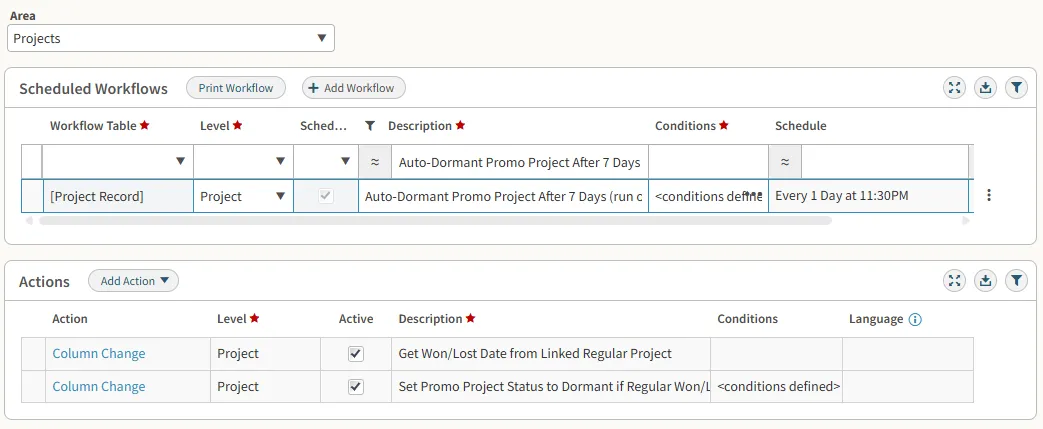
Step 1 — Stage the date. A Column Change action runs a SELECT statement that pulls the Won/Lost date from the linked Regular project and writes it onto a field on the Promo project record. That field exists on the Promo project schema but isn’t surfaced anywhere in the standard UI — which makes it a safe place to stage a value without adding clutter or confusion to what the client sees day to day.
Step 2 — Evaluate and act. A second Column Change action checks whether the staged date is at least the configured threshold in the past — 7 days, in the standard configuration. If the condition is met, it sets the Promo project’s status to Dormant.
Because Step 1 runs first and writes a plain value onto the Promo record itself, Step 2 can evaluate that value using VP’s native workflow conditions — no cross-record logic required at evaluation time. The sequencing is what makes a two-record comparison possible inside a single-record engine.
The whole thing runs once a night, on a schedule (11:30 PM in the reference configuration), sweeping every active Promo project and dormanting the ones that have cleared the delay window.
Why This Holds Up Across Clients
A few design choices made this repeatable rather than a one-off fix:
- No stored procedures. Every piece of logic lives in native VP workflow configuration — Column Change actions and scheduled workflows, both standard platform features. That means deployment to a new client is a configuration exercise, not a development task.
- Configurable delay. The 7-day threshold isn’t hardcoded logic; it’s a condition value. Firms with different timesheet submission cadences can adjust it without touching the underlying design.
- Hidden field as staging area. Using an existing-but-unsurfaced field to carry the Won/Lost date avoids adding new fields to the client’s data model. The solution installs cleanly without any visible footprint beyond the Scheduled Workflows configuration itself.
Result
The pattern eliminated a recurring manual accounting task that had nothing to do with any single client’s specific configuration — it was an industry-wide gap in how VP handles the Promo/Regular project lifecycle. After validating the approach on the first client, I documented the logic and walked two teammates through it directly. It’s since been deployed across more than ten client engagements, independently, by consultants who didn’t need to touch a line of SQL beyond what’s shown in the screenshot below.

That’s the part of this I’d point to first if someone asked what “platform thinking” means in practice: the goal isn’t just solving the problem in front of you. It’s solving it in a way that someone else can pick up and run with, without you in the room.